End-of-Year Team Photos for Remote Teams (No Travel Needed)
Create stunning year-end team photos when your distributed workforce can't gather in one place
It's December, and you're staring at the same dilemma thousands of team leaders face: how do you capture that perfect end-of-year team photo when Sarah's in Seattle, Marcus is in Miami, and half your crew hasn't even met in person? The traditional office photo shoot feels like a relic from another era, yet the need to celebrate your team's accomplishments and showcase unity has never been more important. Here's the truth that's transforming how modern companies approach team photography: you don't need everyone in the same room to create a professional, cohesive end-of-year team photo that looks like you hired a top-tier photographer.
The Distributed Team Photo Challenge Nobody Warned You About
Remote and hybrid work has revolutionized productivity, but it's created unexpected headaches for HR managers and team leaders trying to maintain company culture. The end-of-year team photo isn't just a nice-to-have anymore—it's a crucial touchpoint that reinforces belonging, celebrates collective achievement, and provides essential content for annual reports, holiday cards, and social media presence. Yet coordinating everyone's schedule for a single photo shoot? That's a logistical nightmare that can cost thousands in travel expenses alone.
Ready to Transform Your Photos?
Create stunning AI-generated photos in minutes. Professional quality, endless possibilities.
Get Your Photos NowView pricing plansTraditional solutions fall flat. Video call screenshots look unprofessional with varying lighting and awkward grid layouts. Asking everyone to visit a local photographer creates inconsistent backgrounds and styles. And let's be honest—trying to Photoshop individual photos together manually results in that uncanny valley effect where everyone looks pasted in from different dimensions. The distributed workforce deserves better, and fortunately, AI-powered photography has cracked the code on creating authentic-looking team photos without requiring a single plane ticket.
How AI Composite Team Photos Actually Work
AI composite photography isn't about awkwardly cutting and pasting headshots onto a generic background. Modern AI technology analyzes lighting conditions, shadow patterns, perspective angles, and even subtle color harmonization to seamlessly integrate individual photos into a unified scene. The result? Team photos that look like everyone gathered in the same elegant office, cozy holiday setting, or creative studio space—even though each person submitted their photo from their home office or favorite coffee shop.
The Technology Behind Seamless Integration
Advanced AI algorithms process each team member's individual photo, adjusting lighting, color temperature, and perspective to match the chosen background environment. The technology considers dozens of variables: the direction of light sources, ambient color casts, depth of field consistency, and even the subtle differences in how professional cameras capture images versus smartphone cameras. This intelligent processing ensures that when your team photo is complete, viewers can't detect that it was assembled from separate images—it simply looks like a professionally photographed group.
Key advantages of AI-powered team photos for distributed teams:
- Zero travel costs or coordination headaches—collect photos asynchronously from team members worldwide
- Consistent professional quality regardless of individual photography skills or equipment
- Flexibility to reshoot or swap out individual photos without redoing the entire composition
- Multiple background options and themes without additional photo sessions
- Faster turnaround than traditional photography—days instead of weeks
- Significant cost savings compared to flying everyone to headquarters
Creative Virtual Team Photo Ideas That Actually Look Professional
The beauty of AI-generated team photos extends beyond solving the logistics problem—it opens creative possibilities that traditional photography can't match. Want your team posed in a modern conference room even though your company is fully remote? Done. Prefer a relaxed outdoor setting that captures your brand's approachable culture? Easy. Dreaming of a themed holiday photo with consistent festive backgrounds? Absolutely achievable. The creative freedom transforms your end-of-year team photo from a checkbox task into a genuine expression of company culture.
Professional Office Settings
For companies that want to project traditional professionalism, AI can place your distributed team in sophisticated office environments—think floor-to-ceiling windows with city views, modern conference rooms with sleek furniture, or elegant lobbies with statement architecture. These settings communicate stability and success, perfect for annual reports, investor presentations, or LinkedIn company pages. The AI ensures everyone's positioning looks natural, with appropriate spacing and realistic interaction poses that suggest genuine camaraderie.
Casual and Creative Environments
Tech startups and creative agencies often prefer more relaxed settings that reflect their innovative culture. AI composite photos can place your team in trendy coffee shops, outdoor parks with natural lighting, industrial loft spaces with exposed brick, or even imaginative settings like rooftop terraces or art galleries. These environments tell a story about your company values and help attract talent that resonates with your culture. The technology adapts lighting and color grading to match each environment's unique atmosphere.
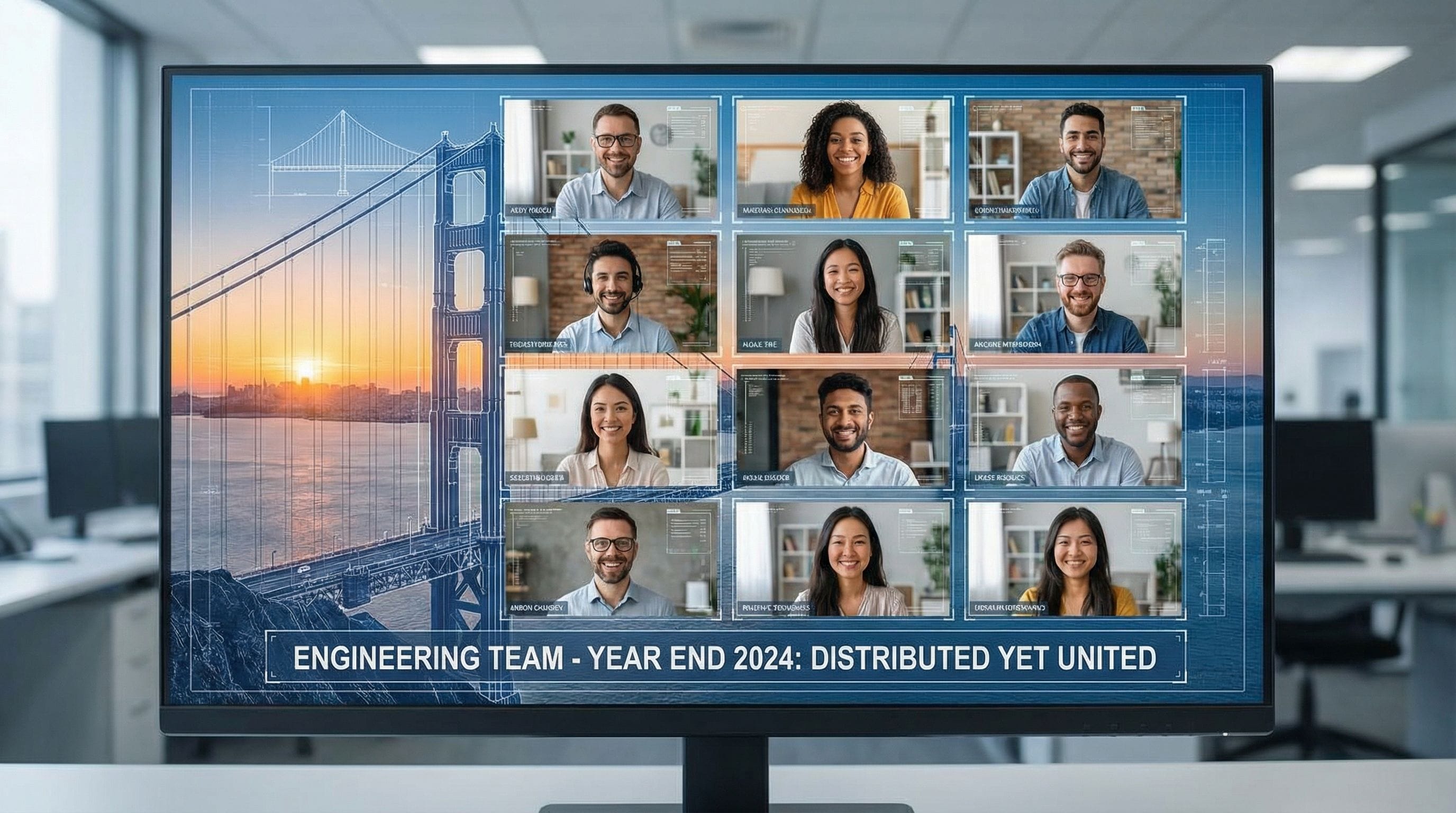
Themed Holiday Team Photos with AI: Beyond the Basic Group Shot
End-of-year team photos often double as holiday cards or social media content, making themed options particularly valuable. AI technology excels at creating cohesive themed photos where every team member appears in complementary settings with consistent holiday elements. Imagine your entire distributed team appearing in matching festive sweaters against a cozy fireplace background, or everyone positioned in a winter wonderland scene with coordinated lighting that suggests they're all experiencing the same magical moment.
The key to successful themed photos lies in providing clear guidelines to team members about what to wear and how to pose, then letting AI handle the complex work of harmonizing individual submissions into a unified vision. You can incorporate company colors into holiday decorations, add subtle branding elements, or create entirely custom themes that reflect inside jokes or company milestones from the past year. This personalization transforms a generic team photo into a memorable celebration that strengthens team bonds despite physical distance.
| Approach | Cost Range | Time Required | Professional Quality | Flexibility |
|---|---|---|---|---|
| Traditional On-Site Photography | $2,000-$10,000+ | 2-4 weeks | Excellent | Very Limited |
| Video Call Screenshots | $0 | 1 hour | Poor | Limited |
| Manual Photoshop Composites | $500-$2,000 | 1-2 weeks | Varies Greatly | Moderate |
| AI-Powered Team Photos | $200-$800 | 2-5 days | Excellent | Highly Flexible |
| Individual Local Photographers | $1,500-$5,000 | 3-6 weeks | Inconsistent | Moderate |
Step-by-Step: Creating Your End-of-Year Team Photo with Photo AI Studio
Creating a professional end-of-year team photo for your remote or distributed team doesn't require technical expertise or photography knowledge. Photo AI Studio streamlines the entire process into manageable steps that respect everyone's time while delivering results that rival traditional professional photography. Here's how to orchestrate your team photo from concept to final delivery, ensuring every team member feels included and the final result exceeds expectations.
Phase One: Planning and Preparation
Start by selecting your desired background environment and overall aesthetic. Do you want formal business attire in a corporate setting, or casual wear in a relaxed environment? Communicate clear guidelines to your team about clothing colors (avoid busy patterns that distract), lighting recommendations (face a window for natural light), and pose suggestions (slight angle rather than straight-on often looks more natural). Create a simple one-page guide with example photos to ensure consistency across all submissions. Set a reasonable deadline that gives everyone time to capture their best photo without rushing.
Phase Two: Collecting Individual Photos
Use a shared folder or simple form where team members can upload their photos. Request high-resolution images (at least 1MB file size) for best results. Encourage team members to submit 2-3 options so you can select the best expression and pose for each person. This flexibility removes pressure and ensures everyone looks their best in the final composition. Review submissions as they arrive and provide gentle feedback if someone's photo won't integrate well due to lighting or angle issues—catching this early prevents disappointment later.
Phase Three: AI Processing and Refinement
Upload your collected photos to Photo AI Studio and select your preferred background template. The AI processes each image, automatically adjusting lighting, color balance, and perspective to create seamless integration. Review the initial composition and make adjustments to positioning—you can typically reorder team members, adjust sizing for depth perception, and fine-tune the overall arrangement. Most platforms offer revision rounds, so don't hesitate to request tweaks until the composition feels perfect. The entire processing typically takes 24-48 hours, though rush options exist for last-minute needs.
Pro tips for optimal results:
- Collect photos with similar head sizes in frame for easier composition balance
- Request team members photograph themselves against neutral, uncluttered backgrounds
- Ensure everyone uses similar photo orientations (all portrait or all landscape)
- Consider hierarchy in positioning—leadership centered or in front rows follows traditional expectations
- Test the composition with a small group first before processing your entire team
- Download high-resolution finals suitable for both print and digital use
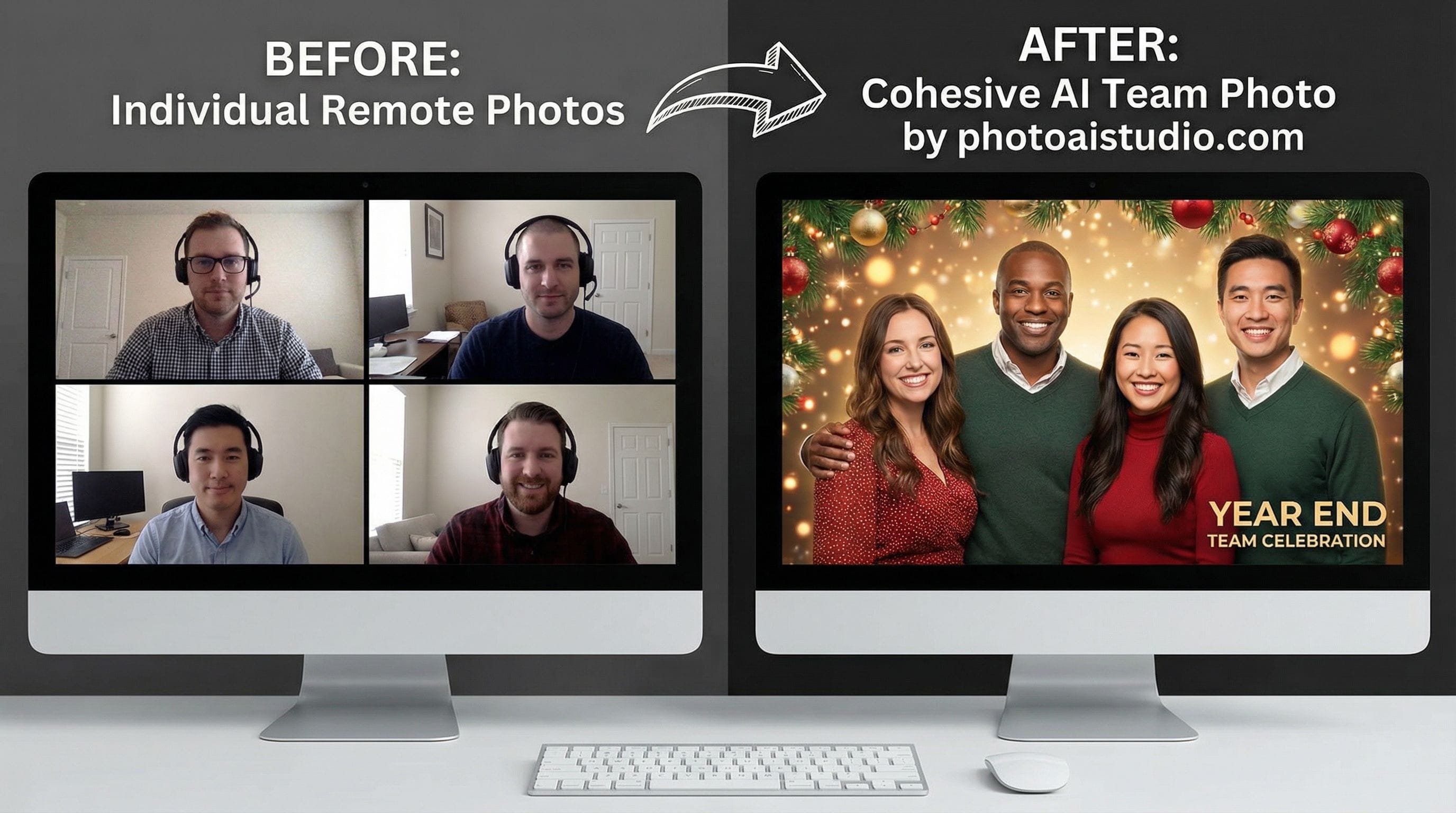
Sharing and Using Your Team Photo Across Multiple Channels
Once you've created your stunning end-of-year team photo, maximize its impact by deploying it strategically across all company touchpoints. This single image can serve multiple purposes throughout the coming year, making the investment in quality particularly worthwhile. Start with the obvious applications—holiday cards, year-end email newsletters, and social media announcements—but don't stop there. Your team photo becomes a valuable asset for recruitment pages, about us sections, investor presentations, and conference materials.
Consider creating variations of your team photo for different contexts. A formal version works for annual reports and business proposals, while a more casual or themed version resonates on social media and company culture pages. Many AI platforms allow you to generate multiple background options from the same set of individual photos, giving you a versatile library of team images for various purposes. This flexibility means your December photo shoot effort continues delivering value throughout the entire year, supporting marketing, recruitment, and internal culture initiatives with minimal additional work.
Internal Culture and Team Morale
Don't underestimate the internal value of a beautiful team photo. Print and frame copies for any physical office spaces. Create digital versions for virtual meeting backgrounds. Feature the photo prominently in internal newsletters and team spaces. When remote team members see themselves professionally represented alongside colleagues they may have never met in person, it reinforces their belonging to something larger than their individual role. This visual representation of unity combats the isolation that can plague distributed teams, serving as a tangible reminder that despite physical distance, everyone contributes to a cohesive whole.
Why AI Team Photos Are the Future of Corporate Photography
The shift toward AI-powered team photography isn't just about solving the logistical challenges of distributed workforces—it represents a fundamental reimagining of what's possible in corporate visual content. Traditional photography required everyone to be available at the same time in the same place, creating inherent exclusion for anyone who couldn't attend due to location, schedule conflicts, parental responsibilities, or health concerns. AI democratizes participation, ensuring every team member can be represented regardless of their circumstances.
Beyond inclusion, AI-powered solutions offer unprecedented flexibility and cost efficiency. Need to add a new hire to the team photo after the original was created? Simple update rather than complete reshoot. Want to test different backgrounds or arrangements? Generate variations without additional photography sessions. Realize someone blinked in their photo? Swap in an alternative without affecting anyone else. This flexibility transforms team photos from a once-yearly ordeal into an ongoing asset that evolves with your organization. As remote and hybrid work becomes permanent for many organizations, the tools and approaches that support distributed collaboration become essential rather than optional.
Frequently Asked Questions About End-of-Year Team Photos for Remote Teams
How realistic do AI composite team photos actually look?
Can we match a specific background or theme for our company brand?
What's the typical turnaround time for creating a team photo?
How do we collect individual photos from team members efficiently?
What if someone joins or leaves the team after we create the photo?
How much does an AI-generated team photo cost compared to traditional photography?
Will team members be able to tell the photo is AI-generated?
Can we use AI team photos for print materials like holiday cards?
Take Action: Create Your End-of-Year Team Photo Today
The end of the year approaches quickly, and your distributed team deserves to be celebrated with a professional photo that captures your collective achievements. Don't let geographic distance prevent you from creating the visual representation of unity that strengthens culture and showcases your team to the world. AI-powered photography has eliminated the barriers that once made team photos a logistical nightmare for remote organizations, replacing complexity with simplicity and replacing compromise with professional quality.
Start your end-of-year team photo project today with Photo AI Studio, where creating stunning composite team photos is as simple as collecting individual images and selecting your preferred background. Whether you need a formal corporate setting, a casual creative environment, or a festive holiday theme, the technology seamlessly integrates your distributed team into a cohesive, professional image that looks like everyone gathered in the same beautiful location. Unite your distributed team visually with Photo AI Studio, and transform the challenge of remote work into an opportunity for creative, inclusive team photography that represents everyone, everywhere.
🤖Get a summary of this article with AI
Related Articles
Elevate Your Brand with Stunning Lawyer Photoshoot Ideas
Transform your legal visuals with AI-powered creativity and professionalism
2025-10-03
Capturing Leadership: The Art of CEO-Themed Photography
Elevate Your Corporate Image with AI-Powered Photoshoots
2025-07-20
Capturing Leadership: The Power of CEO-Themed Photography
Harnessing AI to Showcase Visionary Executives
2025-07-19